If your shop tends to “go through tools” in waves, spring is a smart time to step back and check the basics. Runout is one of the most common culprits because it often does not show up as a single obvious failure. Instead, it quietly chips away at tool life, surface finish, and repeatability until you are chasing problems with feeds and speeds, coolant, and cutter grades that are not the real root cause.
This guide breaks down what runout is in plain English, how it impacts results, what causes it, what to inspect during a spring tooling check, and when it makes more sense to upgrade tool-holding rather than replacing cutting tools over and over.
For more machining and tooling fundamentals, you can also browse the Epic Tool blog hub here: Epic Tool Blog.
What runout is (in plain English)
Tool runout is “wobble.” More specifically, it is the amount the cutting tool’s centerline deviates from the spindle’s true rotational centerline as the assembly spins. If a tool is running with runout, one side of the cutter is effectively taking a heavier bite than the other. On multi-flute tools, one flute can end up doing a disproportionate share of the work, while the others barely cut.
In most shops, runout is discussed in terms of TIR (total indicator runout), measured with an indicator while rotating the tool/toolholder assembly. A common framing is that TIR is a practical measurement of the tool’s deflection relative to the toolholder assembly as it rotates.
How runout quietly hurts tool life, surface finish, and consistency
Runout is a force multiplier. A small amount of wobble becomes a bigger problem because it changes how the cutter engages the material on every revolution.
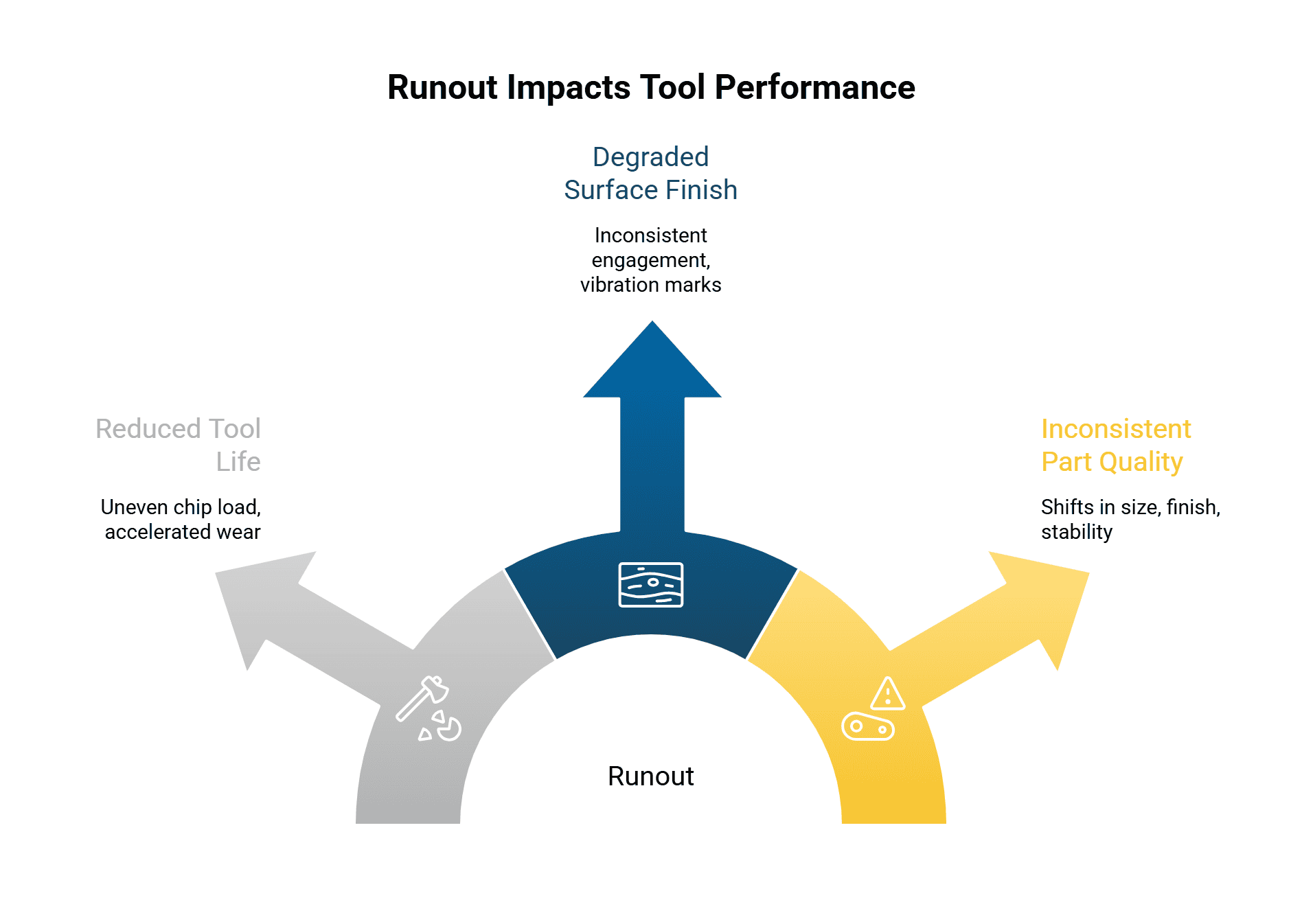
First, it reduces tool life by creating uneven chip load. One cutting edge runs “hotter” because it is removing more material, which accelerates wear and increases the chance of chipping. Many shops experience this as tools failing “early” or unpredictably, even when parameters look reasonable.
Second, it degrades surface finish because the cutter is not tracking a clean circle. Instead of consistent engagement, the cut can alternate between rubbing and cutting. That oscillation is a classic recipe for vibration marks, torn finishes, and extra bench work.
Third, it hurts part-to-part consistency. If runout comes and goes (for example, after tool changes, after cleaning, or after a crash), you can see shifts in size control, finish, and cycle stability that feel random. From an operations standpoint, that is one of the most expensive runout symptoms because it burns time in inspection, offsets, and troubleshooting.
A useful rule-of-thumb that highlights how sensitive tool life can be to runout comes from Techniks’ maintenance guidance: they state you can lose 10% of cutting tool life for every 0.0001″ (“tenth”) of runout. (Your real-world results will vary, but the direction of the relationship is the key point.)
Signs your shop may have a runout problem
Runout rarely announces itself as “runout.” It shows up as patterns. If a few of these are familiar, it is worth putting an indicator on the setup before you blame the cutter.
One common sign is uneven wear across flutes. If one flute looks noticeably more worn or chipped than the others, the tool is not sharing the load evenly.
Another sign is finish that looks inconsistent even with stable parameters. You might get a finish that comes out acceptable on one part, then shows chatter marks or tearing on the next, despite no obvious changes.
A third sign is a constant need to “nurse” tools with offsets and reduced feeds. If you regularly back off parameters to keep tools alive, but the underlying instability never goes away, runout is a plausible hidden driver.
Finally, if tool life improves dramatically when you swap holders (or when you move the job to another machine), that is a strong clue that the cutter itself is not the main problem.
Epic Tool has also called out that holder quality and maintenance affect stability and runout, which in turn impacts tool life. (Epic Tool |)
Common causes of runout (and why they are so easy to miss)
Most runout problems come from the interfaces in the stack-up: spindle taper → toolholder taper → collet/chuck interface → tool shank. A small issue at any interface can create a measurable problem at the cutting edge.
Dirty or damaged tapers
The most common runout cause is also the least exciting: contamination. Dust, dried coolant film, chips, and oil can prevent proper seating. Even thin residue can matter because these assemblies are built around extremely tight tolerances. Techniks explicitly notes that contaminants left on the spindle, taper, flange, collet pocket, collet, or nut can lead to poor TIR and premature wear.
Damage matters too. Small dings, fretting, or galling on the taper can prevent full contact and create repeatable wobble. If you see marking or fretting, treat it as a mechanical fit problem, not a cosmetic one.
Worn collets, nuts, or pockets
Collets wear faster than many people assume, especially in high-change environments. A worn collet can lose gripping consistency and contribute to both runout and tool pullout risk. Techniks flags worn collets as a contributor to premature tool failure and recommends replacement when wear or damage is evident.
Also pay attention to the nut and the pocket. If the nut is damaged, contaminated, or not running true, it can distort how the collet collapses around the shank.
Poor clamping habits and torque control
Runout can be self-inflicted by inconsistent tightening. Over-tightening can damage collets and pockets, while under-tightening can allow micro-movement. The practical fix is boring but effective: use proper torque practices and repeatable setups, especially on collet systems.
Pull studs, drawbar issues, and spindle mouth wear
Sometimes the toolholder is fine, but the machine-side interface is not. Spindle mouth wear (often discussed as “bell mouthing”) can create runout that follows the spindle rather than the holder. Techniks notes that worn spindles can cause runout issues that affect accuracy and cutting quality.
If you have toolholders that start fretting quickly, holders that stick, or runout that changes after tool changes, it is worth considering drawbar/clamping condition and ATC alignment as part of the diagnosis.
Runout vs. tool deflection: don’t chase the wrong problem
Runout and tool deflection can look similar in the cut because both can create chatter, size drift, and finish issues. The difference is that runout is present before cutting begins, while deflection is driven by cutting forces once you engage material.
If you are trying to separate them, check runout at rest with an indicator first. If runout is acceptable but the tool still chatters under load, deflection and rigidity become the next suspects. Epic Tool’s overview of deflection and chatter is a useful refresher if your symptoms show up primarily under load: Tips to Reduce Tool Deflection in CNC Machining.
Spring tooling check: what to inspect (a practical runout audit)
A spring tooling check works best when you treat it like a short audit, not a full teardown. The goal is to confirm that your most-used holders and setups are mechanically sound before peak-season production ramps up.
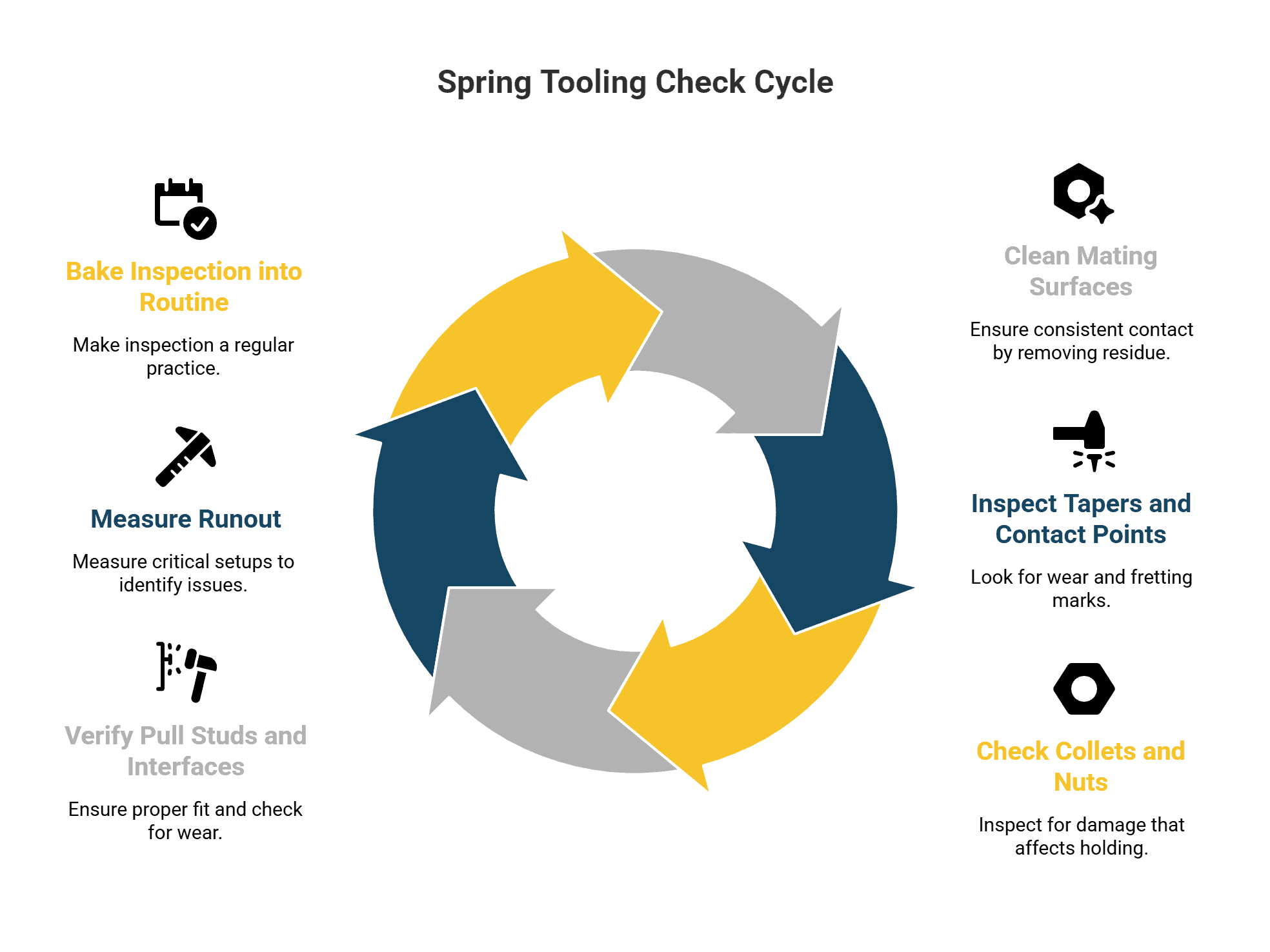
1) Start with cleaning the mating surfaces
Clean the spindle taper and the toolholder taper using a method that does not leave lint behind. Wipe down contact faces, remove dried coolant film, and make sure there is no residue that would prevent full seating. The point is not just cleanliness, it is consistent contact.
2) Inspect tapers, flanges, and contact points under light
Use a bright light to look for dings, fretting marks, or abnormal wear. If you see consistent fretting patterns, treat that holder as suspect until you verify it on a bench check. Techniks describes fretting as evidence of imperfect mating that creates vibration and heat, and notes that noticeable fretting is a sign the holder is becoming worn.
3) Check collets and nuts as wear items
Pull collets and inspect the ID for scoring, bell-mouthing, rust, or any damage that would prevent uniform collapse around the shank. If a tool has spun in a collet, assume the holding performance is compromised and verify it rather than hoping it is “fine.”
4) Verify pull studs and retention interfaces
Pull studs (retention knobs) are both a performance and safety interface. Check for wear, damage, and correct fit for the machine. If you have unexplained runout shifts after tool changes, this is one of the interfaces that can create inconsistency.
5) Measure runout on the setups that matter most
You do not need to measure everything. Measure the holders and tools that drive your quality risk and cost: finishing tools, small-diameter end mills, long-reach tools, and any repeat offenders that “never last.”
Record what you see and build a simple baseline. If one holder is consistently worse than the others, you have actionable evidence that the holder (or machine interface) is part of the problem.
6) Bake inspection into your routine, not just spring cleaning
Epic Tool’s general guidance on inspection discipline is worth applying here: inspection should be regular and thorough, with attention to mounting fit and the downstream problems that come from improper fit. For a broader inspection mindset, see: 3 Tips for Proper CNC Tool Inspection.
When it makes sense to upgrade tool-holding (instead of replacing cutters repeatedly)
If you keep replacing cutting tools but your results do not stabilize, you are likely paying the “symptom tax.” Upgrading tool-holding is not about buying the most expensive option. It is about removing a source of variability that is forcing you to spend money elsewhere.
It often makes sense to consider improved tool-holding when:
You have high-value finishing operations where scrap or rework costs dwarf holder costs.
You rely on small tools, long gauge lengths, or high RPM finishing where even small runout becomes visible at the edge.
Tool life is inconsistent across identical cutters, and the inconsistency follows a holder rather than a program.
You see repeated evidence of taper wear, fretting, or collet wear that returns quickly after replacement.
A practical way to frame the decision is this: if the shop is repeatedly “fixing” performance by swapping cutters, changing brands, or softening parameters, and those fixes only temporarily help, the more durable solution is to reduce the variability in the tool-to-spindle connection.
Epic Tool’s overview page on holders is a useful reference point for thinking through holding choices and why minimizing runout is a key performance driver: Tool Holding Solutions. Epic Tool also touches on the role of quality toolholders in extending tool life in this post: Tips for Prolonging the Life of Your Cutting Tools.
A final note: don’t ignore environment and machine condition
Runout troubleshooting is rarely just one thing. Temperature swings, machine condition, and spindle health all affect stability. If spring brings larger day-to-day temperature variation in your shop, it is worth being mindful of how environment changes can influence performance. For a broader look at environmental factors, this Epic Tool post is a helpful supplement: How Temperature Affects CNC Performance.